

Key Takeaways
• AI adoption is mainstream: 78% of global companies currently use AI and 82% of global companies are either using or exploring the use of AI in their organization. (source)
• Choose by specialization: Top tools are optimized for image, video, text, chat, audio, or code. Choose which one is the best for your needs.
• Balance cloud vs. local: Open‑source models (Stable Diffusion, Code Llama) offer customizability, while cloud services (Adobe Firefly, ChatGPT) provide ease of use.
• Privacy and compliance matter: Select solutions that meet your industry’s data‑handling requirements.
• Experiment and iterate: AI prompts are improving; refine inputs to get better outputs!
Introduction
AI is reshaping every industry, from design and marketing to software development and customer support. In 2025, 78% of global companies have adopted at least one AI solution in their operations, up from just 50% in 2020.

This explosive growth not only reflects the maturity of AI technology, but also underscores its profound impact on efficiency, creativity, and decision-making. Whether you’re a content creator seeking next‑level visuals or a developer automating repetitive coding tasks, there’s an AI tool tailored to your needs.
Welcome to your all-in-one resource for exploring the world of artificial intelligence. This guide brings together 60 hand-picked AI tools, organized into 6 key categories: Image, Video, Text, Chat, Audio, and Coding.
For each tool, you’ll find a clear description, pros and cons, pricing, to quickly understand whether it suits your needs.
Whether you’re a marketer, content creator, developer, or simply AI-curious, this guide will help you discover the right tools to create faster, work smarter, and innovate daily.
1. Top 10 AI image generators
Visual content drives engagement across social media, e‑commerce and advertising. Here are the top 10 image-generation AIs powering this creative revolution (AIxploria).
To benchmark these top 10 AI image generators, we’ll run the same test prompt:
‘A futuristic city street at sunset, bustling with life; neon signs in multiple languages, cyber-clad pedestrians, flying cars overhead; wide-angle, cinematic framing with cool blue shadows against warm orange lights, photorealistic like a sci-fi movie poster’
and compare the results at the end!

Adobe Firefly 4 (link)
Adobe Firefly 4 provides enterprise-grade image generation with integrated Adobe Stock assets and advanced inpainting tools. It’s designed to help users create high-quality visuals quickly with seamless access to Adobe’s vast library.
Pros:
- Seamless access to Adobe’s vast library
- High-quality, consistent outputs
Cons:
- Subscription cost may be steep for casual users
- Limited offline or local deployment
It’s for you if…you need professional-grade visuals and already work within the Adobe ecosystem.
Pricing:
- Free Plan – $0/month
- Firefly Standard Plan – $9.99/month (or $99.99/year)
You can choose a plan based on your needs and usage requirements.

MidJourney V7 (link)
MidJourney V7 is known for its rich, painterly styles and is supported by an active Discord community for prompt sharing. It’s widely used for creating highly detailed and artistic images.
Pros:
- Striking, artistic renderings
- Vibrant community and prompt libraries
Cons:
- Requires Discord familiarity
- Occasional style drift at extreme prompts
It’s for you if…you crave creative, art-driven images and enjoy community collaboration.
Pricing:
- Standard plan – $10/month
- Mega Plan – $120/month

Stable Diffusion 3.5 (link)
Stable Diffusion 3.5 is an open-source image generation tool that allows for local deployment and model fine-tuning. It enables users to generate highly customizable images at different price points.
Pros:
- Fully on-premise for privacy and control
- Large community plugins and extensions
Cons:
- Initial setup and GPU requirements
- Less polished UI compared to cloud services
It’s for you if…you want maximum control over your workflow and data privacy.
Pricing: Priced per image:
- Stable Diffusion 3.5 Large is $0.065 per image
- Stable Diffusion 3.5 Large Turbo is $0.04 per image
- Stable Diffusion 3.5 Medium is $0.035 per image

Leonardo AI (link)
Leonardo AI specializes in character design and concept art, offering intuitive style transfer features for artists. It’s free to use for most, with paid plans available for those seeking additional features.
Pros:
- Optimized for portraits and concept art
- Team sharing and project management features
Cons:
- Paid credits needed for high-resolution exports
- Free tier has limited monthly quota
It’s for you if…you’re an illustrator or game artist needing fast, consistent character designs.
Pricing:
- Free Plan- $0/month
- Maestro Unlimited – $48/month

Ideogram 3.0 (link)
Ideogram 3.0 is focused on creating diagrammatic visuals and infographics, perfect for business presentations. It provides both personal and business plans to cater to various user needs.
Pros:
- Built-in templates for charts and diagrams
- Exports in vector formats
Cons:
- Not ideal for photorealistic images
- Limited artistic style variance
It’s for you if…you need quick, on-brand infographics for reports or slides.
Pricing:
- Free Plan- $0/month
- Plus Plan – $20/month

FLUX.1 (link)
FLUX.1 is designed for fast, photorealistic renders, especially useful in creating product mockups. It’s widely used by designers needing high-quality, quick renderings.
Pros:
- High fidelity suitable for e-commerce
- Easy background removal and lighting presets
Cons:
- Limited to product-centric scenes
- Can incur additional costs for complex renders
It’s for you if…you sell products online and need polished mockups at scale
Pricing:
- Starter Plan – $6.90/month
- Premium Plan – $9.90/month
- Pro Plan – $27.90/month

Reve Image AI (link)
Reve Image offers AI-driven brand imaging with automatic color palettes and typography suggestions, ideal for branding projects. It helps users create cohesive visual identities quickly.
Pros:
- Automatic brand style consistency
- Quick batch processing
Cons:
- Limited free options for small teams
- Less suitable for creative one-off designs
It’s for you if…you manage brand assets and need on-point visuals without manual design.
Pricing:
- Starter Plan – $9.90/month
- Premium Plan – $15.90/month
- Advanced Plan – $22.90/month

Freepik (link)
Freepik is a web-based platform offering vector art generation with editable templates for a wide range of design needs. It allows users to create custom visuals using vast template libraries.
Pros:
- Vast template library across styles
- Direct editing in the browser
Cons:
- Vector focus limits photorealism
- Monthly download limits on lower tiers
It’s for you if…you work with icons, illustrations, or need quick template-based designs.
Pricing: Available with subscriptions:
- Essential Plan – €8.00/month
- Premium Plan – €16.00/month
- Pro Plan – €230/month

Recraft V3 (link)
Recraft V3 is focused on texture and material realism, making it popular with industrial designers for realistic renders. It’s ideal for projects that require high-quality 3D assets and textures.
Pros:
- Best-in-class material realism
- Useful for industrial and architectural renders
Cons:
- Limited 2D output options
- Free tier is capped in resolution
It’s for you if…you’re an industrial designer or architect needing accurate texture simulations.
Pricing:
- Free Plan – $0/month
- Pro Plan – $12/month

Imagen 4 – Google Gemini (link)
Imagen 4 by Google Research is a state-of-the-art image generation model known for its high-fidelity outputs. It combines powerful machine learning with advanced image creation techniques.
Pros:
- State-of-the-art realism and coherence
- Strong performance on complex prompts
Cons:
- Priced per image with no fixed subscription
- No local deployment currently
It’s for you if…you demand the absolute best image quality for professional or research applications.
Pricing: priced per image:
- Imagen 4 Standard Plan is $0.04 per image.
- Imagen 4 Standard Plan is $0.06 per image.
Time for the big reveal! Swipe through the carousel and watch how each of the 10 AI image wizards transformed our cyberpunk city prompt into stunning visuals.



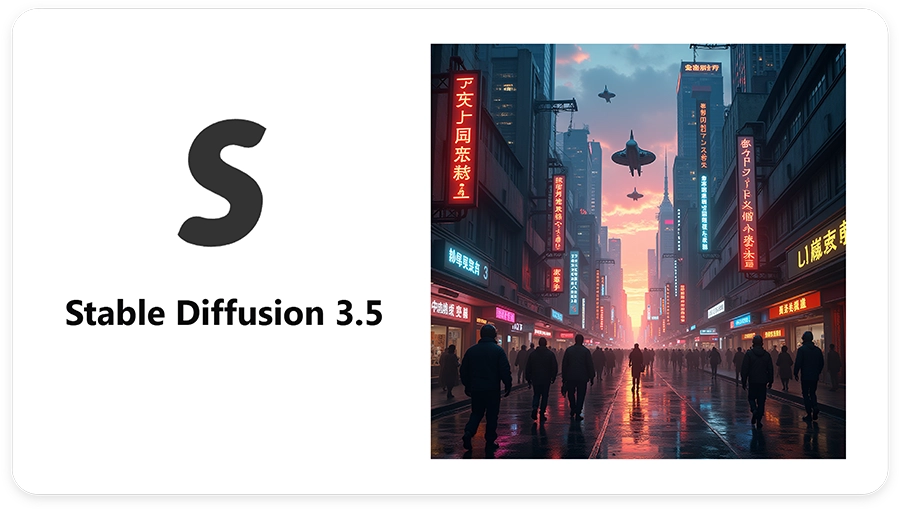
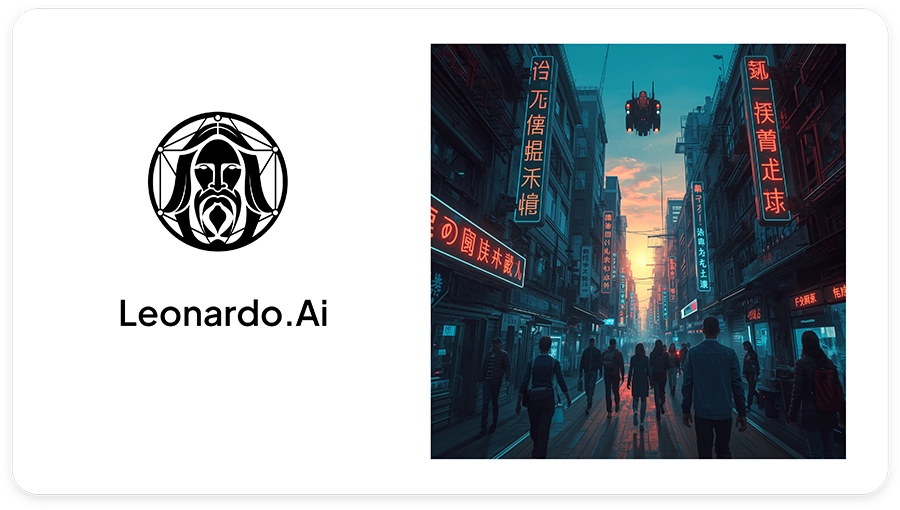

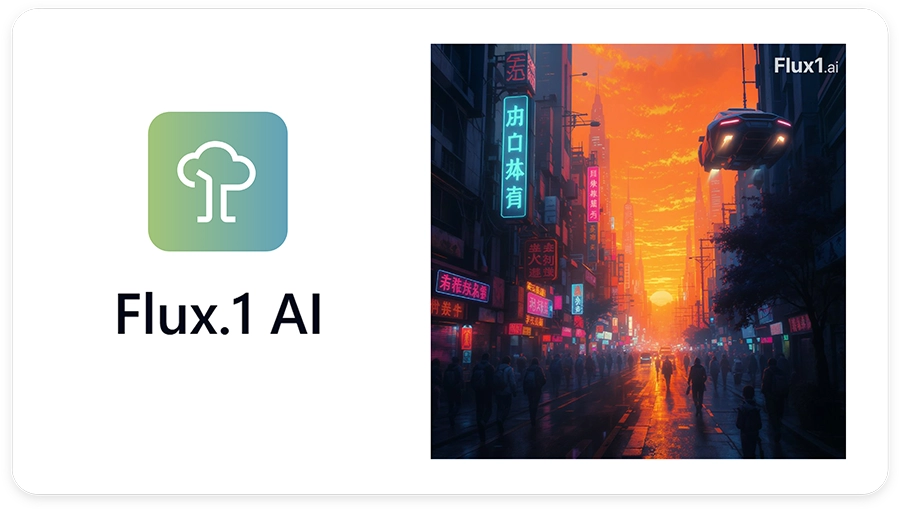
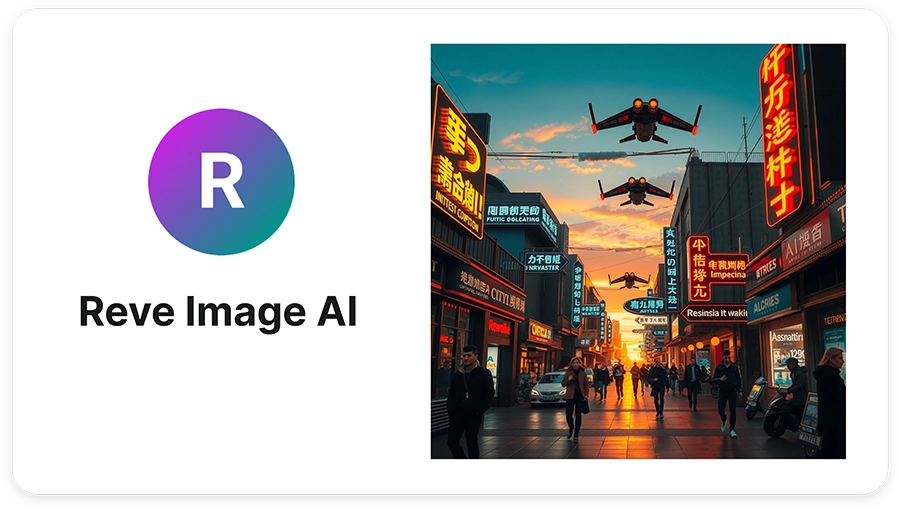


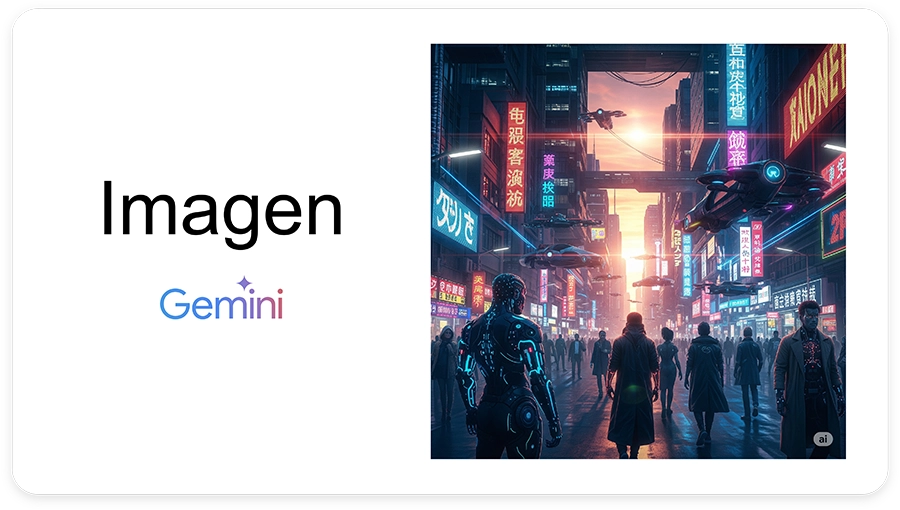
Download the 1-page summary and keep it handy or share it with someone who could really use a boost from these AI image generator tools!
2. Top 10 AI Video generators
Video content is the most engaging medium online, and AI is making it accessible to all. Below are the top 10 AI video generators transforming motion graphics and storytelling:

DeeVid AI (link)
DeeVid AI automates the creation of videos from scripts, offering scene planning and voiceover integration. It’s designed to streamline the video production process for creators and businesses.
Pros:
- Full script-to-video pipeline
- Integrated voice synthesis
Cons:
- Limited creative control over timing
- Watermark on free tier outputs
It’s for you if…you need rapid video production with minimal manual editing.
Pricing:
- Starter Plan – $14/month
- Pro Plan – $35/month
- Premium Plan – $159/month.

Veo 3 – Google Gemini (link)
Veo 3 transforms text prompts into high-fidelity video clips using deep learning. It’s a powerful tool for generating short clips from written descriptions.
Pros:
- High-fidelity motion and texture
- Backed by Google research
Cons:
- Limited clip length (up to 30 seconds)
- Variable frame consistency
It’s for you if… you want quick, high-quality short clips from text descriptions
Pricing:
- Plus Plan – $49.90/month
- Pro Plan – $99.90/month

Kling 2.1 (link)
Kling 2.1 helps create demo reels and social media clips with dynamic caption effects. It is designed for content creators who need fast, high-quality video snippets.
Pros:
- Generates polished video snippets from a prompt or clip in just minutes.
- Adds animated, perfectly timed captions and motion effects for a pro look.
Cons:
- Free exports show a watermark and cap length and resolution.
- Editing controls are basic: no deep color, audio or multi-layer tweaks.
It’s for you if… you post lots of short-form content and want slick results fast without mastering heavy video software.
Pricing:
- Free Plan – $0/month
- Pro Plan – $25.99/month

Luma Dream Machine (link)
Luma Dream Machine turns text and images into realistic, engaging videos. It’s the perfect tool to bring creative projects, storytelling, and visual branding to life.
Pros:
- End-to-end editing automation
- Speeds up filmmaker workflows
Cons:
- Less manual control for fine edits
- Requires stable GPU resources
It’s for you if… you’re a creator looking to offload routine editing tasks.
Pricing:
- Lite – $9.99/month
- Plus – $29.99/month

Hunyuan Video (link)
Hunyuan Video is a suite that automatically stitches scenes and performs color grading. It’s designed to help filmmakers and content creators save time on editing.
Pros:
- Supports both text-to-video and image-to-video workflows, with professional-style camera effects
- Open-source model with 13 billion parameters for state-of-the-art generation
Cons:
- Best suited for short clips; lengthy videos may require stitching multiple outputs
- Limited maximum resolution (720 × 1280); no native 4K output
It’s for you if… pay-per-video AI that lets you rapidly prototype high-quality 720p clips without a long-term subscription.
Pricing: priced per credits:
- 150 credits for $9.99/month
- 750 credits for $44.99/month
- 1500 credits for $79.99/month

Runway Gen‑4 (link)
Runway Gen 4 is a browser-based toolset offering green-screen removal and style transfer features. It’s aimed at creatives needing quick video editing solutions with AI-powered effects.
Pros:
- Cinematic realism with consistent characters and scenes
- Flexible aspect ratios: Export up to 1280×720 in 16:9, 9:16, 1:1, 4:3, 21:9, plus GIF output for social media
Cons:
- No custom model training or style fine-tuning
- May glitch on very complex scenes
It’s for you if… you need studio-grade AI video with fine control and rapid prototyping.
Pricing:
- Free plan – $0 / month
- Pro Plan – $35 / month

Sora – OpenAI (link)
Sora generates video from narrative descriptions. It is integrated with ChatGPT Plus and Pro Plans, offering a unique way to create videos from text.
Pros:
- Generates up to 60 s of video with high visual fidelity and prompt adherence
- Realistic lighting, physics-aware motion and smooth camera moves
Cons:
- Only available to ChatGPT Plus/Pro subscribers (no free access)
- Per-clip length capped at 10 s on Plus and 20 s on Pro plans
It’s for you if… you want to seamlessly turn prompts into polished, multi-aspect AI videos inside ChatGPT and have a Plus/Pro subscription.
Pricing: Sora is included in ChatGPT Plus Plan for $20/month or in ChatGPT Pro Plan for $200/month.

Genmo AI (link)
Genmo AI creates looping animations and generative art videos for music visualization. It’s designed for music creators who want to generate dynamic visuals for their tracks.
Pros:
- Exceptional motion fidelity and prompt adherence for coherent, fluid videos
- Paid Standard/Premium plans remove watermark and allow commercial use
Cons:
- Free tier is limited to 50 credits/month and adds a watermark
- Preview outputs are capped at 480 p resolution until HD model releases
It’s for you if… you want a physics-aware video generator for prototyping, with scalable paid tiers for production.
Pricing:
- Free plan – $0/month
- Standard – $30/month

Wan 2.2 AI Video (link)
Wan 2.1 AI generates realistic talking-head videos from simple text scripts. It is ideal for creating video content quickly without the need for actors or equipment.
Pros:
- Generates crisp 1080p clips in ~15 s with 100+ artistic styles
- Understands English and Chinese prompts and renders readable on-screen text
Cons:
- Default renders are short (≈5-6 s) and no native 4K output
- Requires a strong GPU for self-hosting
It’s for you if… you want speedy, style-rich 1080p videos from an open-source model and are okay paying per second of output.
Pricing:
- Free Plan- $0/month
- Pro Plan – $6.5/month
- Premium Plan – $26/month

Hailuo AI – MiniMax (link)
Hailuo AI provides advanced AI video editing and generation features for content creators. It focuses on efficient video processing and enhancement.
Pros:
- Supports both text‑to‑video and image‑to‑video workflows, enabling creators to start from written prompts or still images for greater control and quality
- Fast iteration and low cost, generating high-quality short clips more affordably than other tools
Cons:
- Limited clip duration, with generation currently capped at only about 5–10 second video lengths
- Output quality varies with prompt and scene complexity, as complex motion or character actions often require multiple iterations and fine‑tuned prompts
It’s for you if… You’re a creator or marketer looking to generate short, cinematic AI videos from text or images quickly and affordably.
Pricing:
- Standard Plan – $9.99/month
- Pro plan – $34.99/month
- Unlimited plan – $94.99/month
Download the one-pager for a quick overview and feel free to share it with anyone who might benefit from these tools.
3. Top 10 AI Text Generators
From blog posts to marketing copy, AI has revolutionized how we write. The top 10 AI text generators for 2025 are:

Semrush Content Toolkit (link)
Semrush offers SEO-optimized article outlines, keyword research and on-page copy suggestions for content creators. It’s designed to improve search rankings and content visibility.
Pros:
- Offers powerful SEO tools that boost content visibility
- Includes detailed keyword and content optimization suggestions
Cons:
- Steep price jump between plans may not suit small creators
- Interface can feel overwhelming for beginners
It’s for you if… You’re focused on improving your website’s SEO performance and search engine ranking.
Pricing:
- Pro Plan – $39.95/month
- Guru Plan – $249.95/month

Rytr (link)
Rytr is a budget-friendly AI writing tool perfect for generating social posts and email drafts quickly. It offers a simple interface to create content on the go.
Pros:
- Fast generation of short-form content like emails and social posts.
- Simple and user-friendly interface for beginners
Cons:
- Lacks depth for long-form or technical content
- Fewer customization options than higher-end tools
It’s for you if… You need a quick, low-cost tool for everyday writing tasks.
Pricing:
- Free Plan – $0/month
- Unlimited Plan – $9/month
- Premium Plan – $29/month

Copy.ai (link)
Copy.ai provides easy setup and templates for generating newsletters, ads, and product descriptions. It helps businesses create quality content in minutes with minimal effort
Pros:
- Prebuilt templates make content generation easy and fast
- Good for marketing copy like ads, product descriptions, and emails
Cons:
- Limited long-form writing capabilities
- Starter plan can be restrictive for scaling businesses
It’s for you if… You want to quickly create compelling marketing content with minimal effort.
Pricing:
- Chat Plan – $29/month
- Agents Plan – $249/month

WriteSonic (link)
WriteSonic is a powerful long-form editor with built-in plagiarism checks, ideal for creating high-quality, original content. It helps users create articles, blogs, and more with ease.
Pros:
- Excellent for long-form content like blogs and articles
- Built-in plagiarism checker enhances originality
Cons:
- Interface can be a bit cluttered for first-time users
- Occasional content accuracy issues in complex topics
It’s for you if… You need a robust tool for generating in-depth, original written content.
Pricing:
- Lite Plan – $49/month
- Standard Plan – $99/month
- Professional Plan – $249/month

Jasper (link)
Jasper is an industry-standard AI tool for maintaining brand tone consistency and supporting multi-language content generation. It’s widely used for creating marketing copy and other business content.
Pros:
- Keeps your copy on-brand with dedicated “Brand Voice” and “Brand IQ” controls, so every writer sounds like your company voice
- Free 7-day trial and an ever-growing app library, so you can test before committing
Cons:
- Feature-rich interface can feel overwhelming for solo creators who just want a quick draft
- No built-in plagiarism checker; you’ll need an extra tool for academic or SEO compliance
It’s for you if… You’re a growth or content-marketing lead who needs brand-perfect copy at scale
Pricing:
- Free 7-Days trial
- Pro Plan – $69/month

Smodin (link)
Smodin is focused on academic writing, offering citation and summarization features to help students and researchers. It simplifies the process of creating well-cited research papers.
Pros:
- Citation generator supports 2,600+ styles, saving hours of formatting
- Academic tool-box in one tab: plagiarism checker, citation machine, essay grader, translator and more
Cons:
- Outputs often need polishing to hit formal academic tone, especially for graduate-level work
- Dashboard crams dozens of mini-apps, so navigation feels busy on a laptop screen
It’s for you if… You’re a student or researcher who wants an all-in-one writing sidekick (citations and plagiarism included) without paying enterprise prices.
Pricing:
- Writing Plan – $15/month
- Reviewing Plan – $25/month
- Ultimate Plan – $30/month

Jenny AI (link)
Jenny AI is a conversational interface designed for brainstorming and iterative drafting of content. It helps writers generate ideas and refine their work in an interactive environment.
Pros:
- Real-time autocomplete inside the editor speeds up drafting. +200 suggestions/day on the free tier
- Upload PDFs and have Jenni cite them automatically; perfect for literature reviews
Cons:
- Formatting tools are minimal (tables, figures, math) compared with Word or Google Docs
- Currently web-only—no offline desktop app for writing on flights or secure networks
It’s for you if… You draft research papers or essays and want Google-Docs-style AI that cites sources for you as you type.
Pricing:
- Free Plan – $0/month
- Unlimited Plan – $30/month

Easy‑Peasy AI (link)
Easy Peasy AI is an ultralightweight tool for generating blog posts and listicles with just one click. It’s designed for quick content creation without complexity.
Pros:
- One-click generation with 200 + content templates great for “I just need it now” tasks
- Multi-modal: images, TTS voice-overs, video generator and even interior-design mock-ups in the same dashboard
Cons:
- Quality skews generic; you’ll often tweak tone or structure for brand fit
- Word-credit system means power users can burn through quotas fast
It’s for you if… You’re a solo creator or small team that wants lots of formats fast (blogs, images, short videos) and can live with some manual polishing.
Pricing:
- Free Plan – $0/month
- Starter Plan – $16/month
- Unlimited Plan – $32/month

HyperWrite AI (link)
HyperWrite AI is a Chrome extension that integrates AI-generated suggestions directly into your text editor, streamlining your writing process. It’s designed to improve content generation with ease.
Pros:
- Built-in real-time research pulls scholarly articles and auto-generates citations
- “Custom Personas” let you teach the AI your tone (3 on Premium, 10 on Ultra)
Cons:
- Requires browser access to everything you type—may raise compliance or privacy flags in regulated industries
- Because it runs in-browser, long documents can feel laggy compared with native editors
It’s for you if… You live inside Chrome and want GPT-style help on any website, especially if you need fast fact-checked snippets with citations.
Pricing:
- Premium Plan – $19.99/month
- Ultra Plan – $44.99/month
Freepik AI text generator (link)
Freepik AI text generator is an AI-powered tool for quickly creating text-based content for designs and visuals. It helps users craft engaging copy for projects and marketing materials.
Pros:
- Embedded in the Freepik design ecosystem, so you can drop copy straight onto mock-ups or social graphics
- AI Suite also covers images, background removal and video: one subscription, many creative tools
Cons:
- Best value comes only if you already use Freepik assets, otherwise you’re paying for extras you may not need
- Outputs lean generic and may not respect nuanced brand voice without manual tweaking
It’s for you if… You’re a designer or social-media freelancer already inside Freepik who wants quick “good-enough” copy blocks right where you create visuals.
Pricing:
- Essential Plan – €8.00/month
- Premium Plan – €16.00/month
- Pro Plan – €230/month
Grab the summary one-pager to keep all 10 AIs in one place and don’t forget to pass it along to someone who might find it useful!
4. Top 10 Chatbots & AI assistants
Customer service, research, and personal productivity all benefit from conversational AI. Here are the top 10 AI chat & assistants in 2025:
ChatGPT – OpenAI (link)
A versatile AI assistant powered by GPT-5, capable of performing various tasks with multimodal abilities. It helps with everything from conversation to content creation.

Pros:
- Multimodal GPT accepts text, images and audio and responds in real-time
- Large marketplace of custom “GPTs,” plug-ins and Code Interpreter lets power-users tailor the bot to niche workflows
Cons:
- Enterprise data-controls exist, but Free/Plus chats may be retained for model-training unless you opt out extras
- Can still invent citations in edge-case topics
It’s for you if… You want a general-purpose assistant with cutting-edge multimodal skills
Pricing:
- Free Plan – €0/month
- Plus Plan – €23.00/month

Grok 4 (X) (link)
Grok 4 integrates real-time conversation into social media platforms, enhancing user interaction. It allows seamless communication within a familiar ecosystem.

Pros:
- Native tool use and real-time X/Twitter search give uniquely up-to-the-minute answers
- Edgy, meme-friendly persona resonates with social-media power users
Cons:
- Outside the X ecosystem integrations are thin, so it’s less useful for email or docs
- Still early-stage: occasional latency spikes and content-filter controversies
It’s for you if… You live on X, crave real-time cultural references, and don’t mind paying extra for a snarky, news-aware sidekick.
Pricing: Standard Grok 4 access is $30/month, via the Grok app or website.

Claude 4 (Anthropic) (link)
A privacy-focused AI with customizable tones for various use cases, ensuring secure interactions. It is designed to adapt to different communication styles.

Pros:
- Accepts 200 k-token docs (≈ 500 pages) in one go—great for contracts or long research
- Privacy-first posture; paid chats are not used for model training by default
Cons:
- Pro plan is $17/mo, otherwise you’re on the slower free tier
- No native image generation or voice mode yet
It’s for you if… you want a smart, ethical AI that excels at deep reasoning, long conversations, and safe, thoughtful responses.
Pricing:
- Free Plan – $0/month
- Pro Plan – $17.00/month
Gemini AI (Google) (link)
Built into Google Workspace, Gemini AI helps with research, email drafting, and productivity tasks. It is designed to assist users within Google’s ecosystem.

Pros:
- Bakes directly into Gmail, Docs, Sheets, Meet and Vids, so AI help appears where you already work
- Google AI Pro plan (€21.99/mo) bundles 2 TB Drive storage and 1 000 monthly AI credits
Cons:
- Outside Google Workspace it’s far less integrated than ChatGPT or Copilot
- Pro plan is priced for prosumers; casual Gmail users may stick to the free, slower tier
It’s for you if… Your life already runs on Google Workspace and you want AI suggestions inside every tab without switching apps
Pricing:
- Free Plan – €0/month
- Google AI Pro Plan – €21.99/month
Qwen3 (Alibaba) link
Qwen3 is an enterprise chatbot that allows secure, on-premise deployments. It uses token-based pricing for scalability.

Pros:
- Supports “thinking” vs “non-thinking” modes for controllable reasoning depth
- Run it on-premises for maximum data control—rare among big LLMs.
Cons:
- Self-hosting demands GPU expertise
- The English-language documentation and user support aren’t as strong or well-developed as those offered by similar Western companies
It’s for you if… You’re an enterprise or research team that needs a low-cost, private LLM you can run behind your own firewall.
Pricing: Priced per tokens:
- Input Tokens – $0.70 per million tokens
- Output Tokens – $2.80 per million tokens

DeepSeek‑R1 (link)
DeepSeek aggregates information from multiple sources, optimized for research purposes. It provides valuable insights for decision-making.

Pros:
- API costs are super low, just $0.14 per million input tokens (with cache) and $2.19 per million output tokens.
- Tuned for research & reasoning; chain-of-thought answers are detailed
Cons:
- Not great for creative writing
- The documentation isn’t complete yet and GitHub questions may go unanswered
It’s for you if… You want a smart, open-source AI that’s great at solving tough problems without paying Big Tech prices
Pricing: Priced per tokens:
- Input Tokens (Cache Hit) – $0.14 per million tokens
- Input Tokens (Cache Miss) – $0.55 per million tokens
- Output Tokens – $2.19 per million tokens

Microsoft Copilot (link)
Integrated within Office 365, Microsoft Copilot aids in document drafting and data analysis. It streamlines productivity within Microsoft’s suite of tools.

Pros:
- Shows up directly in Word, Excel, PowerPoint and Teams
- Enterprise-grade compliance (Purview, audit logs) out of the box
Cons:
- Best experience still Windows-first
- Adds $30/user/month on top of your Microsoft 365 license
It’s for you if… Your org already runs on Microsoft 365 and you crave AI assistance tightly wired into corporate files and meetings.
Pricing:
- Microsoft 365 Copilot – $30 per user per month (annual subscription)
- Microsoft 365 Copilot Chat: Free for Business customers with a qualifying Microsoft 365 plan

Meta AI (link)
Meta AI focuses on conversational commerce, integrating with social media to create content. It offers services like text generation, image creation, and more.

Pros:
- Totally free and now a standalone voice-chat app
- “Imagine” command spits out four images right inside Instagram, Messenger or WhatsApp
Cons:
- Geared toward social and creative fun; weak at coding or spreadsheets
- Opt-out required if you don’t want your chats improving Meta’s models
It’s for you if… You’re a creator or casual user who wants free AI tools for writing and images right inside the Meta apps you already use every day.
Pricing: Meta AI is currently free for users.

Le Chat by Mistral AI (link)
Le Chat is a multilingual conversational assistant that can browse the web and generate images. It provides real-time updates and supports various languages.

Pros:
- Snappy EU-hosted chat with live web search and code execution
- GDPR-friendly data location for European businesses
Cons:
- Smaller ecosystem: few plug-ins, limited mobile stability reports
- Model zoo narrower than OpenAI or Anthropic
It’s for you if… You’re looking for a lightweight chat assistant based in the EU, with flexible pricing that grows with your needs and clear, honest data policies
Pricing:
- Free Plan – $0/month
- Pro Plan – $14.99/month

Kimi.ai (link)
Kimi.ai enhances productivity by offering AI-powered assistance for various tasks. It streamlines workflows and helps users accomplish more.

Pros:
- Low cost: API prices are super affordable, about 70% cheaper than GPT-4
- Can understand up to 2 million characters at once, like reading a whole novel in one go.
Cons:
- Web app and docs still China-centric; English UI feels rough
- Young ecosystem: few ready-made integrations or plug-ins yet
It’s for you if… You work with huge documents (e.g. legal papers, research, or tech manuals) and need a low-cost AI that can handle lots of information at once.
Pricing: Kimi.ai offers the free use of the Kimi K2 model through its app and browser.
For commercial use, the pricing is:
- $0.15 per million input tokens
- $2.50 per million output tokens
Don’t let this knowledge go to waste! Download the one-page summary and share it with someone who could truly level up with these tools.
5. Top 10 AI Text-to-Speech & Audio Generation
Enhancing content with natural‑sounding audio is easier than ever. The top 10 AI audio generators for voiceovers and music are:

Suno AI V4 (link)
Suno AI is a generative AI platform specializing in music creation. Version 4, released in November 2024, introduced significant improvements, including high-quality audio generation, custom song creation, and the ability to remaster previous tracks.
Pros:
- Makes full songs (music + vocals) from short prompts in minutes
- Good presets for styles (pop, rock, EDM, etc.) so beginners get decent results fast
Cons:
- Originality can feel “AI-ish”; you’ll often need edits to sound unique
- Fine control over specific instruments or mix settings is limited
It’s for you if… you want fast, catchy song ideas without learning music production
Pricing:
- Free Plan – $0/month
- Pro Plan – $10/month

Udio (link)
Udio is a voice cloning tool that automates podcast-ready voice generation and ad reads. It provides users with a seamless way to create high-quality audio content using custom voice models for various applications like podcasts and advertisements.
Pros:
- Quickly makes clean, “podcast-ready” voice tracks from your script.
- Simple workflow: type text, pick a voice, download.
Cons:
- Less suited for complex music mixing compared to full DAWs.
- Cloned or synthetic voices can sound a bit “perfect” or flat without tweaks.
It’s for you if… you need quick, consistent voiceovers for podcasts, videos, or ads.
Pricing:
- Free Plan – $0/month
- Pro Plan – $30/month

AIVA (link)
AIVA is an AI-powered music composer that generates original scores for film, games, and ambient soundtracks. It allows users to create professional-grade music compositions tailored to their specific needs, with the ability to adjust genres and styles.
Pros:
- Generates instrumental music that fits moods (dark, uplifting, cinematic)
- Great for background scores where lyrics aren’t needed
Cons:
- Melodies can sound generic if you don’t guide it carefully.
- Less control over detailed arrangement than a human composer.
It’s for you if… you need ready-to-use instrumental music for videos, games, or apps.
Pricing:
- Free Plan- $0/month
- Pro Plan – $49/month

Mubert AI (link)
Mubert AI generates endless, royalty-free music streams, ideal for videos, games, and other multimedia projects. It ensures a continuous flow of music without copyright concerns, offering customized soundscapes for creators.
Pros:
- Generates nonstop music you can safely use online (royalty-free plans).
- Good for creators who just need “background” sound quickly.
Cons:
- Not ideal for catchy, vocal-led songs.
- Must pick the right license tier to avoid takedowns on some platforms.
It’s for you if… you want quick, safe background music for streams, apps, or videos.
Pricing:
- Free Plan – $0/month
- Pro Plan – $39/month

Voicemy.ai (link)
Voicemy.ai is a multilingual text-to-speech (TTS) tool that features emotional intonation control, allowing users to create lifelike AI voices. It also offers melody composition features, making it versatile for voiceover work and music production.
Pros:
- Emotion controls (calm, excited, sad) make readings less robotic.
- Many languages and accents, useful for global audiences.
Cons:
- Emotional settings still need trial and error to sound natural.
- Long narrations may reveal small pronunciation quirks.
It’s for you if… you need lifelike voiceovers in different languages on a budget
Pricing:
- Starter Plan – $9.99/month
- Pro Plan – $19.99/month

Riffusion (link)
Riffusion uses AI to generate soundscapes from text prompts, creating ambient or atmospheric music for various uses. It is designed for artists and developers who want to quickly create unique audio experiences based on their creative input.
Pros:
- Very fast idea generation from short prompts.
- Great for ambient textures, atmospheres, and experimental sounds.
Cons:
- Limited structure, results are more “vibes” than full tracks.
- You’ll likely edit the audio elsewhere to fit your project.
It’s for you if… you want quick ambient sounds or sonic “mood boards.”
Pricing:
- Free Plan – $0/month
- Member Plan – $48/month

Beatoven (link)
Beatoven is an AI music generator that creates custom beats and soundtracks tailored to the duration of your video. It allows content creators to automatically generate soundtracks that perfectly fit their video content’s pace and theme.
Pros:
- Good for YouTube, explainers, and product demos.
- Auto-matches the exact length of your video, no manual cutting needed.
Cons:
- Less creative freedom for complex compositions.
- You’ll still want to mix it a bit to sit nicely under voice.
It’s for you if… you need tidy, to-length soundtracks for videos with minimal effort.
Pricing:
- Free plan – $0/month
- Visionary Plan – $100/year

YuE AI (link)
YuE AI generates realistic singing voices, ideal for jingles, vocal demos, and music production. It is designed to help creators generate vocal tracks without the need for a live singer.
Pros:
- Useful for testing melodies before booking a studio.
- Creates realistic vocals for hooks, demos, and jingles.
Cons:
- Pronunciation and emotion may need several tries.
- Matching a very specific singer’s style is risky, watch rights and likeness laws.
It’s for you if… you want quick demo vocals to bring song ideas to life.
Pricing:
- Free plan – $0/month
- Pro Plan – $18.99/month

Jammable (link)
Jammable is an AI-powered music creation tool that enables users to quickly generate, mix, and modify tracks in real time. It allows musicians and producers to experiment with new ideas by adjusting parameters like tempo, genre, and mood, making it an easy tool for both beginners and professionals.
Pros:
- Fast way to get loops, intros, or beat ideas without deep skills.
- Play with genre, tempo, and mood live. It’s great for brainstorming.
Cons:
- “One-click” changes can still need editing to sound pro.
- Not ideal for detailed, track-by-track control.
It’s for you if… you want a quick sandbox to try music ideas and build drafts.
Pricing:
- Basic Plan – €8.99/month
- Creator Plan – €24.99/month

Mureka (link)
Transforms musical inspiration into refined tracks by allowing users to train custom AI models using their own uploaded music, enabling the creation of songs that reflect their distinct style and preferences.
Pros:
- Helpful for producers with a back catalog they want to repurpose.
- You can teach it your style, so new songs feel closer to your sound.
Cons:
- Training takes time and clean source files for best results.
- Still benefits from human mixing and mastering afterward.
It’s for you if… you have your own tracks and want an AI that writes in your style.
Pricing:
- Free plan – $0/month
- Pro plan – $30/month
Get the 1-page cheat sheet now and send it to a friend or teammate who needs to see this!
6. Top 10 Coding & “Assistant Code” AIs
Developers leverage AI to write, review, and refactor code. The top 10 coding assistants in 2025 are:

GitHub Copilot AI (link)
GitHub Copilot is an AI-powered code completion tool that helps developers by suggesting context-aware code and testing solutions directly within their IDE. It can generate entire code blocks and assist in writing tests, making development faster and efficient.
Pros:
- Suggests whole lines or blocks of code as you type, saving time.
- Learns from the project’s context, so the suggestions feel “on topic.”
Cons:
- Sometimes guesses wrong and you still need to know what the code should do.
- Needs an internet connection and sends code snippets to the cloud.
It’s for you if… you spend hours writing code and want quick suggestions right in your IDE.
Pricing:
- Free plan – $0/month
- Pro plan – $10/month

Cursor AI (link)
Cursor AI offers a coding environment with deep repository understanding and multi-language support. It provides smart code completions, documentation generation, and refactoring suggestions, enabling faster development across different programming languages.
Pros:
- Understands large repos, so it can jump to the right file or function fast.
- Handles many languages, useful in mixed-tech projects.
Cons:
- Heavier on computer resources than simpler extensions.
- Refactor advice can be generic; you’ll still review it line by line.
It’s for you if… you juggle big multi-language codebases and want an in-editor “tour guide.”
Pricing:
- Free plan – $0/month
- Pro plan – $16/month

Windsurf Editor (link)
Windsurf Editor is a notebook-style code editor that blends text, code, and AI-driven prompts, allowing for an interactive development process. It provides an intuitive interface for developers to combine explanations and code in a seamless workflow.
Pros:
- Notebook style mixes text and code, great for tutorials or data notes.
- Built-in AI prompts help explain snippets in plain language.
Cons:
- Not ideal for very large projects or complex build pipelines.
- Limited plugin ecosystem compared with VS Code or JetBrains.
It’s for you if… you like writing code and explanations side-by-side, as in a lab notebook.
Pricing:
- Free plan – $0/month
- Pro plan – $15/month

Replit AI (link)
Replit AI is an in-browser coding platform with AI-powered pair programming and automatic deployment. It allows developers to write, test, and deploy code from anywhere without the need for local development environments.
Pros:
- One-click deployment lets you see results live in seconds
- Real-time pair-programming AI can nudge beginners in the right direction
Cons:
- Web IDE can feel slow for huge projects
- Free tier limits compute time and private repos
It’s for you if… you want to code from any device and ship quick demos without fussing with servers.
Pricing:
- Free plan – $0/month
- Core plan – $20/month

Cline (link)
Cline is a command-line AI tool designed to assist with shell scripting and automation tasks. It helps developers quickly generate scripts, automate workflows, and provide suggestions for common terminal commands.
Pros:
- Generates shell scripts fast, saving copy-paste from Stack Overflow
- Totally open source; you only pay your chosen AI model’s usage fees
Cons:
- Still requires comfort with command-line tools
- Fewer guardrails: a wrong command could still break things
It’s for you if… you live in the terminal and want autocomplete super-powers for Bash or ZSH.
Pricing: Cline is free and open source. You only pay for AI usage at your provider’s exact rate. No markups, no fees.

Kilo Code (link)
Kilo Code is an AI-assisted code generation tool focused on creating microservices and APIs. It streamlines the process of building scalable services with intelligent code suggestions and architecture guidance.
Pros:
- Focuses on microservices and APIs, great for cloud-native work
- Offers architecture hints, not just code snippets
Cons:
- Best suited to backend tasks; little help for UI code
- You still need to understand service design to judge its output
It’s for you if… you’re building lots of small services and want a co-pilot that “thinks” in APIs.
Pricing: Kilo Code is free and open source.

Code Llama 70B (link)
Code Llama 70B is a high-performance language model fine‑tuned by Meta on top of Llama 2, with 70 billion parameters, focused specifically on coding tasks like generation, infilling, and instruction‑following. It’s designed to boost productivity by providing accurate code suggestions and explanations.
Pros:
- Large 70-billion-parameter model gives rich, detailed answers
- Supports generation, fill-in-the-middle, and natural-language questions
Cons:
- Heavy model: needs serious hardware or paid API access
- Token costs ($0.20–$0.90/million) add up in long sessions
It’s for you if… you want state-of-the-art AI brainpower and don’t mind managing the compute bill.
Pricing: When run via cloud APIs, its cost per token typically ranges from $0.20 to $0.90 per million tokens.

Firebase Studio (link)
Firebase Studio is a visual interface for building full-stack apps with AI guidance, providing seamless integration with Firebase services. It simplifies app development by offering a user-friendly way to create and manage apps without deep coding expertise.
Pros:
- Built-in AI tips connect components to Firebase services correctly
- Good for non-experts who just need a working prototype
Cons:
- Still relies on Firebase. Lock-in can be hard to escape later
- Limited flexibility for custom backend stacks
It’s for you if… you want to spin up a full-stack app fast without diving deep into code.
Pricing: Firebase Studio is free. However, some features and integrations, like certain Cloud services used with Firebase (e.g., Firebase App Hosting), may require a Cloud Billing account and incur costs.

Amazon CodeWhisperer (link)
Amazon CodeWhisperer is an AI-powered code suggestion tool that integrates seamlessly with AWS services. It provides real-time code suggestions with security scanning, making it easy for developers to build secure, scalable applications on AWS.
Pros:
- Tight AWS integration, auto-suggests code that matches AWS SDKs.
- Built-in security scan flags risky code patterns on the fly.
Cons:
- Best value only if you’re already deep in AWS.
- Suggestions can be AWS-centric, less helpful for other clouds.
It’s for you if… you build most of your workloads on AWS and want security-aware code hints.
Pricing:
- Free plan – $0/month
- Pro plan – $19/month

Devin AI by Cognition (link)
Devin AI is a cognitive AI assistant designed for developers to improve productivity by suggesting code, debugging, and offering programming insights. It helps automate repetitive tasks and generates context-aware solutions for a variety of coding problems.
Pros:
- Automates repetitive coding chores, from tests to small fixes.
- Scales to team usage with a managed environment.
Cons:
- Still evolving. Feature set may change quickly.
- Works best when you provide detailed context; otherwise answers feel generic.
It’s for you if… you need a versatile assistant to lighten your coding workload and a budget that flexes with usage.
Pricing:
- Core Plan – Pay as you go, starting at $20
- Team Plan – $500/month
Download the one-pager to stay on top of things and share it with someone who’s looking for the right code-assistant to help them out.
Conclusion
From stunning visuals to seamless code, the AI landscape in 2025 offers specialized tools for virtually every creative and technical task.
By selecting the right platform in each category, you can unlock productivity gains, reduce costs and deliver more engaging content.
FAQ
How do I choose between cloud‑based and open‑source AI tools?
Cloud services offer turn key experiences with automatic updates, while open‑source tools grant full control over data and customization. Consider your team’s technical expertise and data policies.
Are these AI tools free to use?
Most offer tiered plans, like free trials or limited‑use free tiers, with paid subscriptions for higher quotas, enterprise features or commercial licensing.
What’s the best way to optimize prompts for image generation?
Start with clear, descriptive language (styles, colors, subjects), then iteratively refine by adding modifiers (lighting, mood, composition terms).
Which AI is better?
There’s no one “best” AI across all tasks; each excels in its specialty. For image creation, tools like Adobe Firefly and MidJourney lead the pack. For text generation, Jasper and WriteSonic dominate. For conversational AI, ChatGPT and Claude stand out.
Pinpoint your primary goal (visuals, copy, chat, code, etc.) and choose the top-rated tool in that category.
What’s the best AI to use?
Start by defining your use case. If it’s content creation (images/videos) you can try Adobe Firefly, Stable Diffusion or Runway. For copywriting use Jasper or Rytr. For chat & support u can useChatGPT, Claude or Microsoft Copilot.
If you need help in coding you can try GitHub Copilot, Code Llama 70B or Cursor AI.
What is the most advanced AI tool?
Currently, the most cutting‑edge systems include:
• GPT (OpenAI): Multimodal LLM with real‑time reasoning and image understanding.
• Google Gemini Ultra: State‑of‑the‑art multimodal model powering image, text, and code generation.
• Imagen (Google Research): Leading research model for coherent, high‑fidelity image synthesis.
These platforms push the boundaries of AI creativity, comprehension, and multimodal integration.
Get the one-pagers now!


Comments on Best AI Platforms & Tools in 2025: the definitive guide by category & use case
seedance 2
Thank you for the insightful article on AI platforms and tools! It’s great to see the emphasis on choosing tools by specialization and balancing cloud vs. local solutions. The point about privacy and compliance is also crucial in today’s landscape. I’m particularly interested in how these considerations apply to video AI.
Witt
I liked that the conclusion focused on choosing the right AI tool for the job instead of assuming one platform can do everything. The point about balancing productivity, cost, and content quality really reflects how most people are using AI today. My biggest takeaway is that understanding each tool’s strengths is becoming just as important as knowing how to use AI in general.