

Key Takeaways:
- The Executive Summary is the heart of an effective presentation. It is not just an introduction but a strategic synthesis that must capture attention, structure the message, and make the presentation more persuasive. If well designed, it can determine the success of the entire presentation, whereas a weak executive summary risks losing the audience’s interest within seconds.
- There are different Executive Summary models, each with a specific function. Not all presentations have the same objective, which is why choosing the most suitable template is essential: the essential model for quick and clear communication, the solution-driven model for presenting business strategies, the visual dashboard for managing complex data, and the start-up template designed to persuade investors with brevity and impact.
- Design plays a key role in understanding and conveying the message. A good executive summary follows principles of visual minimalism and information hierarchy, avoiding cognitive overload. The strategic use of white space, visual contrasts, and financial storytelling in start-up presentations enhances the audience experience, facilitates retention, and increases the chances of presentation success.
Every Presentation Must Begin with a Clear and Impactful Summary That Communicates Value and Generates Interest in Seconds
Imagine this scenario: you have to introduce an innovative project to a group of executives. You have spent time and energy preparing a detailed presentation, filled with data and in-depth analysis.
However, as soon as you start speaking, you notice a certain distraction among the audience. Some are checking emails on their phones, others are flipping through documents, and some seem to have lost interest within minutes.
Disaster!
What went wrong?
Often, the issue is not with the content of the presentation itself but with its organization and communication approach.
In a corporate setting, the audience does not necessarily need to know every single detail right away. First and foremost, they want to grasp the big picture, understand the essence of the project, and then decide if they want to delve deeper.
In other words, what they want is an executive summary—a concise, strategic summary of a longer document that provides a clear and immediate overview of the key points, making the difference between an effective presentation and one that fails to engage the audience.
Do you want to know how to create a powerful executive summary with which to fully involve your audience?
I’ll explain everything in this article.
Let’s get started!
The Role of the Executive Summary in Effective Presentations: A Matter of Strategy!
Think about it for a moment: isn’t every presentation a strategic journey?
Of course it is! Your goal is to lead your audience to understand your point of view. Ideally, you want them to make a decision that aligns with what you want.
But if the executive summary is weak—or worse, if you didn’t prepare one—well, let’s be honest: you risk throwing everything away!
Many people mistakenly think of the executive summary as just an introduction, something to start with.
Come on, let’s be serious!
The truth is that it must do much more: it must be a powerful synthesis that, in just a few words, conveys the full strength of your message. Like a movie trailer, it should intrigue, give a clear idea of what you will talk about, but without spoiling everything, of course!
Specifically, a well-crafted executive summary has three essential functions:
- Capture attention. Go straight to the point, eliminate the unnecessary, and focus only on the essential information. You don’t want them to fall asleep, do you?
- Provide a logical structure to the message. Guide the audience step by step, starting from the problem and leading to the solution. A clear and linear path that is easy to follow.
- Make the presentation more convincing. If you immediately demonstrate the value of what you are saying, you ignite interest and make them more inclined to listen attentively and engage.
Now that we’ve covered the theory, you’re probably thinking: “Okay, but how do I put this into practice?”
Simple: by applying a ready-made template that guides you in creating an outstanding executive summary for your presentation!
That’s exactly what I want to provide in the following sections. And not just one, but four example templates!
To be honest, on my website, you’ll find more than four: dozens of ready-to-use PowerPoint templates to make creating presentations easier and faster than you ever imagined! And if you’re looking for the ultimate tool to accelerate your workflow, take a look at our MLC PowerPoint Add-In: it is specifically designed to help you create professional presentations in a fraction of the time.
But for the executive summary, the following will suffice.
An Essential and Customizable Template
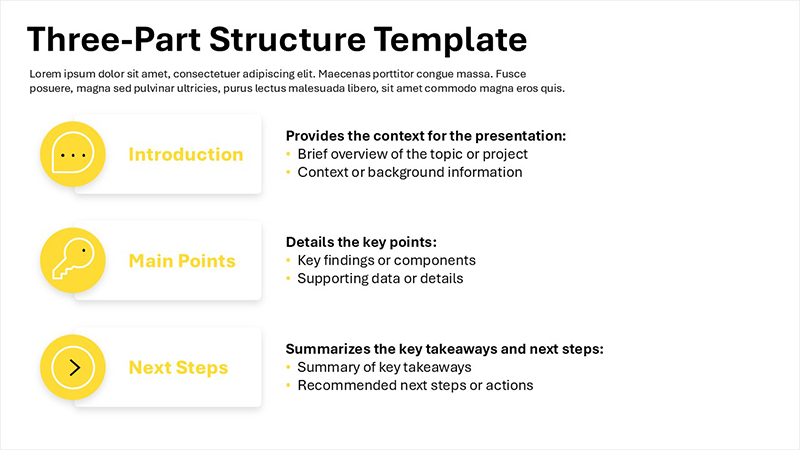
This template is characterized by a simple and direct structure, divided into three main sections, each serving a specific function:
- Introduction, which provides the general context within which the presentation is set, clearly framing the topic to be discussed;
- Main points, aimed at highlighting the key elements of the discourse, meaning the fundamental messages that the audience should easily grasp and remember;
- Conclusion, with the goal of concisely summarizing the key points previously presented and, where appropriate, suggesting next steps to take or the main conclusions to draw.
Imagine a page crammed with text, intricate graphs, and flashy colors.
A terrible strain on your eyes, right?
This template takes the exact opposite approach. We have deliberately removed the unnecessary, focusing on the essential, following the sacred principle of “less is more.” The absence of overly complex graphic elements and the generous use of white space are not random choices. They are strategic decisions to ensure optimal readability and a sense of immediate communication.
Think about when you read a well-laid-out book: the words have room to breathe, your eyes don’t get tired, and comprehension flows effortlessly. That’s precisely the experience we want to recreate. Our goal is for your audience to absorb information naturally, without effort, without that annoying cognitive overload that often overwhelms us when we are bombarded with too much information at once.
Following the logical thread of the discourse should be a seamless experience, not an orientation challenge. The structure of this template is designed to guide the audience step by step, preventing anyone from raising their hand to ask: “Wait, where were we?”. The idea is to keep everyone on the same wavelength, ensuring no one gets lost along the way—or worse, starts thinking about their grocery list instead of listening to you.
In this template, we have applied the principle of information hierarchy, which suggests first presenting the overall picture and only later introducing specific details if they prove necessary for a more complete understanding.
Now you’re probably wondering: “Okay, this all sounds great, but when can I actually use this template?”
Easy: you can use it (actually, you SHOULD use it) for internal business meetings, concise briefings, project progress update reports, and, more generally, in all situations where it is essential to communicate clearly, concisely, and effectively. Its simple structure makes it particularly effective in contexts that require both quick communication and a precise focus on key points.
A Solution-Driven Model

This template is specifically designed to guide the audience through a logical problem-solving process, structured into four distinct and sequential phases:
- Goal – Clearly defines the ultimate result to be achieved through the presented project or strategy.
- Obstacle – Identifies and describes the specific difficulties or challenges that could hinder achieving the defined goal.
- Strategy – Presents the detailed action plan developed to overcome the identified obstacles, outlining the overall strategic approach.
- Action – The final section lists the concrete and necessary steps to implement the defined strategy, translating it into practical actions.
Thanks to this structure, each phase has its own well-defined and easily recognizable space. There’s no risk of getting lost among half-finished concepts or drowning in overcrowded slides. The visual organization remains clean and essential, like a well-written instruction manual rather than a frustrating guide that makes you want to give up and call customer support.
This template works because it follows one of the fundamental laws of persuasive communication: the problem-solution model. First, the problem is presented to capture attention and create a sense of urgency; then, the solution is introduced as the long-awaited answer.
It’s the same mechanism that makes detective movies engaging: first, the mystery; then, the clues; and finally, the resolution that puts everything in place.
When should you use it?
I recommend applying it to presentations that need to demonstrate solidity and concreteness, such as business plans, corporate strategies, complex projects, and detailed roadmaps. In situations where it is essential to show that there is a clear and well-defined plan, this structure is a powerful ally: it helps build trust and makes it clear that every step has been carefully studied to reach the goal without leaving anything to chance.
The “Visual Dashboard” Model: Effectively Summarizing Complex Data
Let’s talk about those presentations packed with data—so packed that, if you misstep in their design, you risk losing your audience’s attention in no time.
You know what I mean, right?
Think about:
- Quarterly or annual financial reports, where you need to present company performance recorded over a specific period of time;
- In-depth market analysis presentations, where you must highlight emerging trends, key industry data, and the most relevant market dynamics;
- Continuous monitoring of KPIs (Key Performance Indicators), to provide updates on business metrics considered essential for success.
In all these situations, there’s a high risk of creating executive summaries overloaded with numbers, data, charts, and countless other elements that only contribute to making your audience… completely lost. Handling this complexity requires specific design skills, and if you’re not confident in achieving a clean and effective result, relying on a PowerPoint presentation design agency can make all the difference.
The solution?
The third template I propose: the Visual Dashboard, a real lifesaver for those who need to present data without making the audience feel like they’re staring at an instruction manual for a spaceship.

We designed it specifically to enable quick reading and facilitate an intuitive understanding of the most important information, relying heavily on graphs, eye-catching infographics, and minimal text.
A well-thought-out use of clear visual contrasts helps direct the viewer’s gaze straight to the key information, avoiding that classic “where should I look?” moment, which often leads people to stare at a random spot on the screen, hoping they don’t look confused. This eliminates the risk of information overload and maximizes communication effectiveness.
The true strength of this model? It transforms numbers and complex data into clear and accessible information. Essentially, it takes all that chaos of tables and percentages and serves it on a silver platter—ready to be absorbed without causing indigestion.
And speaking of indigestion… think of data presentations like a meal: if you overload your audience with too much information at once, they’ll feel like they’ve just devoured a five-course meal in ten minutes. It’s a miracle if they come out unscathed! Instead, our model portions information in a digestible way, preventing the audience from suffering from data overload.
It is based on the principle of Visual Data Storytelling, because data without context is like a joke without a punchline: technically, it’s a joke, but no one laughs. Here, every piece of information is accompanied by a visual narrative that makes it comprehensible and engaging, transforming “raw data” into a story that the audience can effortlessly follow.
The Start-Up Model: Persuading with Conciseness and Vision
A specific template designed for start-ups is a must, especially when pitching to potential investors you absolutely need to convince to support your idea.

This template has been developed with a sharp focus on capturing the attention of investors and key stakeholders quickly and effectively, delivering only the essential information in a format that is concise, well-structured, and, above all, persuasive.
Its internal structure strictly follows the well-established “problem-solution” narrative logic (remember? We already discussed this in the second model), with a strong emphasis on clearly communicating the unique value of the business proposal and highlighting its growth potential.
Here are its key elements:
- Punch Statement – A striking phrase, formulated concisely and memorably, capable of effectively summarizing the core value and uniqueness of the presented proposal;
- Problem → Solution → Opportunity – A linear narrative structure that unfolds by clearly and sequentially presenting the problem to be solved, the innovative solution proposed, and, finally, the market opportunity that this solution can successfully tap into;
- Investment Strategy – A dedicated section presenting a carefully selected set of key numbers, realistic financial projections, and well-defined, scalable growth strategies. The primary objective here is to demonstrate a solid return-on-investment potential for financiers. If you fail to do that, they won’t invest a single cent…;
- Team – A final section focusing on showcasing the people behind the project, highlighting the specific skills and previous experience of key team members. This section plays a crucial role in increasing the credibility of the proposal and fostering investor confidence in the project.
Potential investors, as you know, are always in a rush. They have rapid decision-making processes (think “yes/no, next!”) and a flood of proposals to evaluate daily. They receive pitches non-stop—a raging river of ideas, some brilliant, some less so.
So, in this competitive storm, if your presentation doesn’t strike them like lightning on the road to Damascus (or at least make them raise an eyebrow in curiosity) within the first few seconds, they’ll move on to the next pitch as if yours never existed.
The model I propose follows the sacred principles of financial storytelling, meaning that to convince an investor, you must tell them a compelling story that keeps them glued to their seat. Here’s how:
- Clearly, precisely, and unequivocally identify a significant market problem that affects a broad segment of potential customers;
- Convincingly demonstrate, backed by data, the existence of a clearly identifiable audience that is willing to pay for the proposed solution to solve the identified problem;
- Present concrete data, realistic financial projections, and measurable performance metrics that tangibly confirm the technical and economic feasibility of the solution, as well as its scalability in the medium-to-long term.
And, before I close, speaking of pitches… Check out my book Startup Pitch Presentation: a practical guide on how to effectively structure a presentation for investors in order to get funding for your startup.
It will be your secret weapon in these kinds of presentations!
Read also: PowerPoint hacks you’ve never heard of
The difference between success and failure? A well-crafted executive summary
How many times have you seen presentations sink under the weight of confusing data, chaotic structures, and overloaded slides? How often have you attended meetings where, after just a few minutes, people lost interest and stopped listening?
A well-crafted executive summary is the antidote to all of this. It’s the key to transforming an anonymous presentation into an effective presentation. It’s the tool that allows you to grab your audience from the very first seconds and never let them go until the end.
Now, the choice is yours. You can keep hoping that people will have the patience to sit through your entire presentation without a clear and compelling introduction… or you can apply these strategies, use the right templates, and build a presentation that makes an impact.
I have a pretty good idea about which path is worth taking. And I’m sure you do too.
Well, all that’s left is for you to put into practice what I’ve outlined in this article. And once you’ve done that, how about sharing your experience in the comments?
I’m really curious to hear how your presentations turned out!
BONUS! You can download 4 Examples of Executive Slides here.
Executive summary examples on PowerPoint: FAQ
What is an executive summary, and why is it important in a presentation?
An executive summary is a strategic synthesis of a presentation or a broader document, designed to quickly capture attention and provide a clear overview of key points. It’s essential because it helps the audience immediately grasp the value of the proposal, increasing the chances of maintaining engagement and receiving a positive response.
What is the problem-solution communication model?
The problem-solution model is a communication strategy that involves presenting a problem followed by its solution, with the goal of capturing attention and guiding the audience toward a clear and logical understanding. This approach is particularly effective in business presentations, startup pitches, and business plans because it helps create a sense of urgency and demonstrates the value of the proposed solution.
How do you design an effective executive summary?
An effective executive summary must be clear, concise, and logically structured. It should follow principles of visual minimalism, avoid information overload, and focus on a narrative that highlights the problem, the solution, and the benefits. The strategic use of graphics, white space, and direct language helps make the summary more impactful and persuasive.


Comments on 4 Illustrated Examples of Executive Summaries in PowerPoint