
Once the template is ready, teams also need a reliable source of presentation-ready building blocks. The free MLC PowerPoint template collection brings editable layouts together with visual resources for building clearer business presentations.
Key Takeaways
• A template should not be a constraint but a strategic ally that accelerates the creation of effective presentations.
• The MLC framework consists of four stages – Assess, Design, Implement, Update – to design templates based on users’ real needs.
• Active listening and analysis of existing materials are essential to create a model that responds to actual workflows.
• Iterative prototyping allows for refining layouts with stakeholders, avoiding time-wasting and endless corrections.
• The implementation phase includes not only technical development but also training to promote widespread adoption of the template.
• A template should be kept alive over time with regular check-ups and updates, creating a true corporate culture of efficiency.
• Cases like Acqua di Parma and the TEA Group show how a well-designed template can enhance productivity and visual consistency.
In many organizations, the corporate PowerPoint template is seen as an obstacle: a set of rigid rules that limits creativity, complicates daily work, and causes frustration.
The result?
Teams are forced to violate guidelines just to complete the slides, presentations are inconsistent across functions, and an enormous amount of time is wasted on modifications and corrections.
But the corporate template doesn’t have to be a constraint: when designed properly, it can become a powerful productivity accelerator, a tool capable of standardizing communication, simplifying work, and ensuring brand consistency in every context. Templates end up being discarded, violated, and often thrown away.
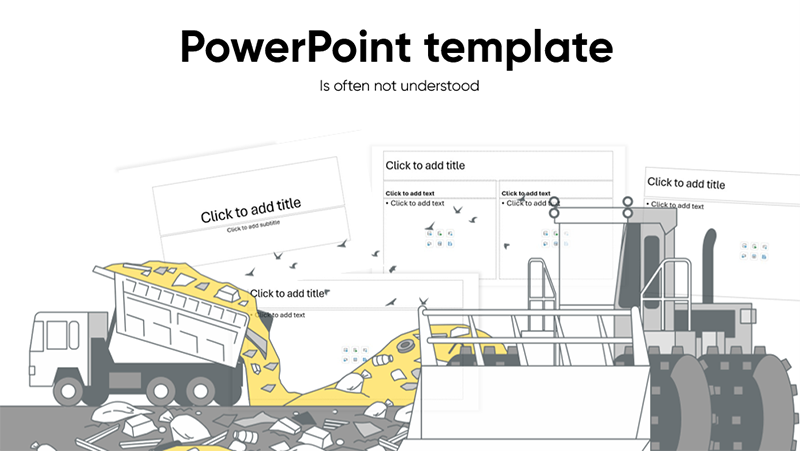
The problem lies in the creation process of most corporate templates, often requested from generalist communication or graphic design agencies (not specialized in creating PowerPoint templates) and then imposed from above by the communications departments of large companies.
A PowerPoint template can be a tool of great efficiency and can truly help brands communicate consistently, both within and outside the company boundaries, but it must necessarily reflect the real needs of the users, that is, those who actually make the presentations in the company.
MLC’s approach to creating corporate templates is based on a simple yet innovative idea: transforming the template into a strategic asset, built around the real needs of users, with a structured method involving analysis, design, implementation, and continuous updating.
Only then does the template become a daily ally, capable of supporting people in creating effective presentations in less time and with greater quality.
The MLC Perspective: The Template as a Driver of Productivity and Communication Consistency
When we at MLC receive a request to create a new corporate template, we are often asked to embellish a certain number of slides.
However, the brief is often wrong!
We believe that no company needs a few embellished slides but rather what those slides, if designed correctly, allow us to achieve. So, the first question to ask is: what do we want to achieve through the creation of these templates?
The corporate template is a tool that saves us time if implemented correctly and helps create a uniform and consistent communication base for the brand and the company itself.
In our approach, we see the corporate template as a true engine of efficiency. A good template boosts the team’s productivity by eliminating the need to reinvent layouts every time.
Thanks to a predefined structure of slides and graphic styles, every collaborator finds the essential elements ready: correct margins, colors, fonts, and logos placed in the right spots.
This way, they don’t waste time formatting each slide from scratch and can focus on the strategic content.
Therefore, we must clarify the goals we want to achieve and understand that redesigning a couple of slides won’t help us reach them. What’s needed is a structured approach that allows us to transform a PowerPoint template into higher-level objectives.
The MLC Framework: The Four Stages (Assess, Design, Implement, Update)
At MLC, we follow a clear and replicable process, broken down into four key stages:
• Assess: Data collection and initial analysis. In this phase, we listen to the client and evaluate the current set of slides and guidelines. The goal is to understand how the current template is being used, identify emerging issues, and determine the real needs of the users.
• Design: Template ideation and prototyping. We define content clusters (types of slides needed), main layouts (e.g., covers, content, charts), and create graphic assets (color palette, icons, reference images). We work in rapid iterations, showing drafts to company representatives and gathering feedback.
• Implement: Final creation and rollout. After design approval, we develop the actual template file (slide master and layouts). This is followed by the rollout: a training session with the teams, supporting documentation, and delivery to end users.
• Update: Ongoing monitoring and maintenance. A template is never “finished.” We schedule periodic check-ups to gather suggestions, update assets, and train new team members. This ensures the template stays aligned with brand evolution or new tools.
This framework supports the adoption of the template as an ongoing project, not just a one-off intervention.

ASSESS – Active listening and analysis of materials

In each phase, everything starts with listening. We dedicate time to briefings with stakeholders and key users: marketing managers, internal communications, sales, and those who use PowerPoint daily within the company.
Often, hidden issues emerge in the workflows: for example, slides recreated differently each time, multiple logos depending on the department, or worse, separate files for different languages.
We analyze the existing materials by gathering old templates, presentations in use, and any available graphic assets. This inventory is valuable: it shows which layouts are truly needed, which slides are underused, and where graphic resources can be streamlined.
Thanks to this “audit,” we understand the real needs of the company and define the scope of action for the new template. At MLC, I like to say that the template project starts well before opening PowerPoint: it begins with a deep understanding of how organizations communicate today.
Corporate Template System
A template is not just a set of layouts but a collection of graphic assets that represent and bring the brand to life. I’m talking about all those graphic elements that make up the brand (icons, images, vector representations, etc.) as part of the company’s assets. Often, users end up copy-pasting these objects from the latest presentations, losing, over time, the original version, which inevitably ends up being used in a pixelated or low-resolution form on some slide.
DESIGN – Design centered on needs: clusters, layouts, and graphic assets

The design phase is based on the content clusters identified earlier. Each cluster represents a recurring communication opportunity (e.g., financial results presentation, project report, sales pitch, etc.).
For each, we define dedicated layouts: for example, a cover slide, a summary slide, or a chart slide.

Example of basic layout structure:
- Cover/Opening slide: title, speakers, date, logo.
- Agenda/Index: content structure.
- Section divider: slide to separate major topics.
- Content: various types of layouts for text, charts, and images.
- Closing/Contacts: final thanks or contact information.
There are also many other layouts, often used in business contexts such as: SWOT, Timeline, Gantt, Organizational charts, etc.
At MLC, we provide a rich library of ready-to-use PowerPoint templates, which I always recommend using to avoid reinventing the wheel.

Alongside the layouts, we create a customized Graphic Library: a set of icons consistent with the brand, royalty-free thematic images, and company color palettes optimized for projectors.
This graphic asset library accelerates the preparation of future slides: every user will be able to access icons and images already selected to reinforce the visual message.
Through our MLC PowerPoint Add-in, we create the system of slides and graphic assets for the company via shared folders that are directly accessible in PowerPoint.


The MLC style is lean and user-centered. We don’t design the template abstractly, but test each element by asking: “Does it really serve a purpose? Is it intuitive?”
For example, rather than providing 20 nearly identical layouts, we group variants by function. I often say: better a few well-thought-out layouts than dozens of unused slides.
The final result is a streamlined set of “use-case” layouts, where your team finds exactly what they need for each type of presentation.
IMPLEMENT – Template culture: continuous training and periodic check-ups

A successful template becomes a company asset. It’s not enough to deliver it once: it’s essential to promote its correct use.
That’s why we focus on training the company workforce to communicate effectively through presentations via hands-on sessions (in person or online), where we explain how to use the slide master in PowerPoint, how to create new consistent slides, and how to leverage the Graphic Library.
These activities raise awareness: users understand the value of placing the logo uniformly, using standard titles, and selecting the most appropriate layout from the PowerPoint menu.
MLC training supports the implementation of the corporate template because it allows us to share and communicate best adoption practices, overcoming resistance to change in real-time. Additionally, through training, we are able to foster a culture and awareness of responsible, consistent communication in line with brand guidelines.
UPDATE – Evolutionary Maintenance and Template Culture

The final pillar of the MLC framework is Update, which involves the care and evolution of the template over time.
An effective template is not static because the company and the market evolve: new brand values, changes to the logo, or updates to the tone of voice require periodic updates to the model.
This is why MLC provides regular update plans: feedback is gathered from users (for example, through internal surveys), and it’s assessed which layouts are working or need improvements. Additionally, every new project or campaign presents an opportunity to integrate new resources into the template (new icons, additional color themes, recent graphic assets).
At the same time, Update promotes a true template culture.
The goal is for users to see the template as a daily ally. To this end, MLC carries out internal communication initiatives: newsletters, project updates, and Q&A sessions.
As stated in MLC’s materials, their workshops “instill a culture of efficiency and impact” in corporate communication.
In other words, it emphasizes the idea that using the template correctly is part of the job: this leads to greater visual consistency and saves time for those who need to prepare slides. Thanks to this approach, the template doesn’t remain a static file but evolves with the business and becomes a shared asset for everyone.
2 Success Cases Signed by MLC: Acqua di Parma and Gruppo TEA
To share the effectiveness of our method, let’s look at two real cases:
Acqua di Parma – Centralized Elegance, Global Consistency
When the CMO contacted us, the issue was clear: too many voices, one brand. We began with a thorough analysis of needs, mapped international clusters, and distilled the chromatic-typographic DNA of the Maison.
The template was created in-house at MLC, complete with guidelines, photographic assets, and graphic modules ready for every retail touchpoint.
Then came the tough part: training the “champions” from each country at the headquarters in Parma, so they could spread the message in-store. Semi-annual check-ups, timely updates, and one rule: elegance is not improvised.
The result?
A rock-solid visual language that still smells of history – and deserves to be fully discovered.

Gruppo TEA – Radical Engagement, Template Born from the People
Here, the issue wasn’t identity, but the frustration of those who opened PowerPoint every day. We took the opposite approach: first culture, then design.
Plenary workshops to explain what a corporate template truly is, task forces of employees divided into teams, one-on-one coaching with MLC, and finally, a “challenge” in front of top management.
Each team presented their proposal, the jury provided concrete feedback, and we collected the best ideas to develop the final master.
In practice, training came before the product: when the final template was released, the users already felt it was theirs. A clear proof that putting people at the center is not rhetoric – it’s a winning method.
In both cases, the transition to a structured template transformed corporate communication: from a scattered process to a streamlined and recognizable flow.

Conclusion: The Template as a Strategic Tool for Corporate Communication
In conclusion, the corporate template is not a hodgepodge of slides, but a strategic communication tool, essential for the productivity of the corporate workforce.
To view it as a constraint is a mistake: with the right methodological approach, it becomes a lever for efficiency, consistency, and branding. For years, in my MLC projects, I have seen how a well-conceived template streamlines internal processes, provides uniformity to messages, and saves valuable time for professionals across all sectors.
I therefore invite companies and responsible teams to rethink their model: starting from the MLC framework, transform the template into an asset that accelerates the work of everyone.
Remember that, in addition to creating it, it must be nurtured over time with training and updates. Only then will this tool become part of the corporate culture, making a concrete contribution to communication objectives.
With this structured and innovative approach, the template ceases to be a constraint and becomes a tangible resource: a true engine of productivity and professionalism for the entire company.
Additional Resources
How to Create a Business PowerPoint Template
If you’ve ever wondered how to create a truly effective corporate template, this guide will walk you through the process step by step, from the technical basics of the slide master to the construction of coherent and functional layouts. You’ll learn how to set up covers, agendas, section dividers, and content slides, how to create custom graphic assets, and how to use the slide master to automate work. A valuable resource for anyone looking to elevate their skills and understand what makes a template a true strategic tool, not just a simple graphic file.

Corporate PowerPoint Template: Why It Doesn’t Work and How to Make It Work
Have you ever thought that the corporate template could be one of the main obstacles to your team’s productivity?
This guide breaks down the common misconceptions about corporate templates, explaining with concrete examples why they are often seen as a constraint rather than an opportunity.
You will discover how to avoid strategic mistakes that lead collaborators to ignore the template, how graphic agencies often fail with a top-down approach, and why the lack of training on the slide master is the leading cause of failure. A must-read for anyone who wants to truly understand what makes a template ineffective and how to turn it into a powerful ally for corporate communication.

FAQ: Everything You Need to Know About Corporate PowerPoint Templates
What is a corporate PowerPoint template?
A corporate PowerPoint template is a pre-set model that includes slide masters, standard layouts, color palettes, fonts, and graphic assets consistent with the brand. It helps speed up the creation of presentations and ensures visual consistency.
Why is the corporate PowerPoint template important?
Because it standardizes visual communication, saves time in slide preparation, and helps reinforce the brand identity in every internal or external presentation.
How do you create an effective corporate PowerPoint template?
It starts with analyzing the real needs of users and auditing existing presentations. Then, layout clusters are defined, slide masters with smart placeholders are created, and prototypes are tested in rapid iterations, collecting feedback.
How many layouts should a good corporate template contain?
There is no fixed number: an effective template includes only the layouts truly necessary to cover recurring use cases, avoiding dozens of unused variants that create confusion.
What is the difference between a theme and a layout in PowerPoint?
The theme defines the global elements (colors, fonts, effects) that apply to all layouts. Layouts, on the other hand, are the “frames” for each slide, customizable with placeholders for titles, texts, images, or charts.
What should you do if a corporate template doesn’t work well?
Analyze with users the reasons for dissatisfaction, collect examples of problematic presentations, and update the template with a bottom-up approach, offering training on the correct use of the slide master.
How do you update an existing corporate template?
By scheduling periodic check-ups, collecting feedback from teams, and adding or modifying layouts and assets based on new business needs, while always maintaining consistency with the brand guidelines.
Get the PDF now!


Comments on The Corporate PowerPoint Template as an Efficiency Engine: MLC’s Design Approach